- Salesforce Starter Suite
- Salesforce Pro Suite
- ActiveCampaign
- Zoho CRM
- Pipedrive
- Freshsales (Freshworks CRM)
- EngageBay
- Keap
- GoHighLevel
- Systeme.io
- Monday CRM
- Close CRM

Why Businesses Look for HubSpot Alternatives
HubSpot is widely respected for good reason. It combines CRM, marketing, sales, and support tools into one polished ecosystem, and for many companies it genuinely works. The problem is not whether HubSpot is powerful. The problem is whether that power is practical for most small and growing businesses.
As companies move beyond the early stages, friction often appears. Pricing increases quickly as contact lists grow or additional features are unlocked. Tools that look affordable at first can become expensive once automation, reporting, or advanced sales functionality is required. For many SMBs, the jump between entry level and usable plans feels steep and unavoidable.
Another common issue is feature gating. Core capabilities such as advanced workflows, attribution reporting, or deeper customization are frequently restricted to higher tiers. This creates a situation where teams pay not for what they actively use, but for access to what they might need later.
Complexity is the third challenge. HubSpot is designed to support large, multi team organizations. Smaller teams often find themselves navigating dashboards, settings, and tools they do not fully need, while still lacking flexibility in the areas that matter most to them.
This is why businesses start looking elsewhere. Not because HubSpot fails, but because their needs change.
This guide is designed to help you make that decision clearly. Inside, you will find twelve real HubSpot alternatives, each explained in practical terms. You will see who each platform is best for, where it excels, and where it falls short. No hype, no vague comparisons, just honest tradeoffs.
By the end, you will know exactly which platform fits your business stage, your budget, and your growth goals.
What to Look for in a HubSpot Alternative
Before comparing tools, it is important to understand what actually matters when replacing HubSpot. The right alternative is not the one with the longest feature list. It is the one that supports how your business operates today and how it plans to grow.
Start with CRM fundamentals. Any serious alternative should handle contact management, deal pipelines, activity tracking, and basic reporting reliably. These are non negotiable. If a platform struggles here, advanced features will not compensate for weak foundations.
Next, evaluate marketing automation depth. Look closely at email capabilities, workflow logic, triggers, and segmentation. Some tools offer simple autoresponders, while others provide advanced multi step automation. The right level depends on your strategy, not on marketing buzzwords.
Ease of use versus customization is another key factor. Some platforms prioritize simplicity and speed. Others offer deep customization at the cost of setup time and learning curve. Small teams often benefit from tools that work well out of the box, while agencies and technical teams may prefer flexibility.
Pricing transparency matters more than most businesses expect. Look beyond the starting price. Understand how costs scale with contacts, users, and features. Predictable pricing often matters more than cheap pricing.
Scalability should be evaluated honestly. A solopreneur does not need the same system as a ten person sales team or an agency managing multiple clients. Choose a platform that fits your next stage, not one that assumes enterprise complexity from day one.
Finally, consider whether you want an all in one platform or a modular stack. All in one tools reduce integrations and simplify management. Modular tools allow you to swap components as needs change. There is no universal right answer, only what aligns with your operational style.
Using this framework will make the comparisons ahead far clearer and far more useful.
Quick Comparison Table: HubSpot Alternatives at a Glance
Before diving into detailed breakdowns, it helps to see the landscape at a glance. Most readers evaluating HubSpot alternatives are not starting from zero. They already know roughly what they need, but want a faster way to narrow the field. This comparison snapshot is designed to do exactly that.
The table below summarizes all twelve alternatives using the same evaluation lens. Each tool is mapped by its ideal use case, core strength, automation maturity, CRM depth, and entry level pricing. This makes it easier to spot patterns quickly. Some platforms are clearly sales focused. Others prioritize marketing automation, agencies, creators, or service based workflows.
Automation level reflects how advanced and flexible the workflow system is, ranging from basic autoresponders to multi channel logic with conditions and triggers. CRM depth indicates how well the platform handles pipelines, reporting, customization, and long term account management. Starting price is included to set expectations, not to imply total cost, since most platforms scale based on usage.
This table is not meant to replace deeper analysis. It is meant to filter. In many cases, readers can eliminate half the options within seconds just by matching their business type to the “Best For” column. From there, the individual sections that follow explain context, tradeoffs, and real world fit in much more detail.
Use this snapshot as your orientation layer. The sections that follow are where the real decision making happens.
| Tool | Best For | Core Strength | Automation Level | CRM Depth | Starting Price |
|---|---|---|---|---|---|
| Salesforce Starter Suite | Growing SMBs | Scalable CRM foundation | Medium | High | Entry level paid |
| Salesforce Pro Suite | Advanced SMB teams | Full CRM + automation | High | Very High | Mid tier paid |
| ActiveCampaign | Marketing driven teams | Email & automation | Very High | Medium | Low to mid |
| Zoho CRM | Cost conscious businesses | Broad all in one ecosystem | High | High | Low |
| Pipedrive | Sales focused teams | Visual pipelines | Low to Medium | Medium | Low |
| Freshsales | Sales + support teams | Unified customer view | Medium | Medium to High | Low |
| EngageBay | Budget SMBs | All in one simplicity | Medium | Medium | Very Low |
| Keap | Service businesses | Client lifecycle automation | Medium | Medium | Mid |
| GoHighLevel | Agencies | White label automation | Very High | High | Mid |
| Systeme.io | Creators | Funnels & email | Medium | Low | Very Low |
| Monday CRM | Workflow driven teams | Custom pipelines & tasks | Low to Medium | Medium | Low |
| Close CRM | Inside sales teams | Calling & outbound | Low | Medium | Mid |
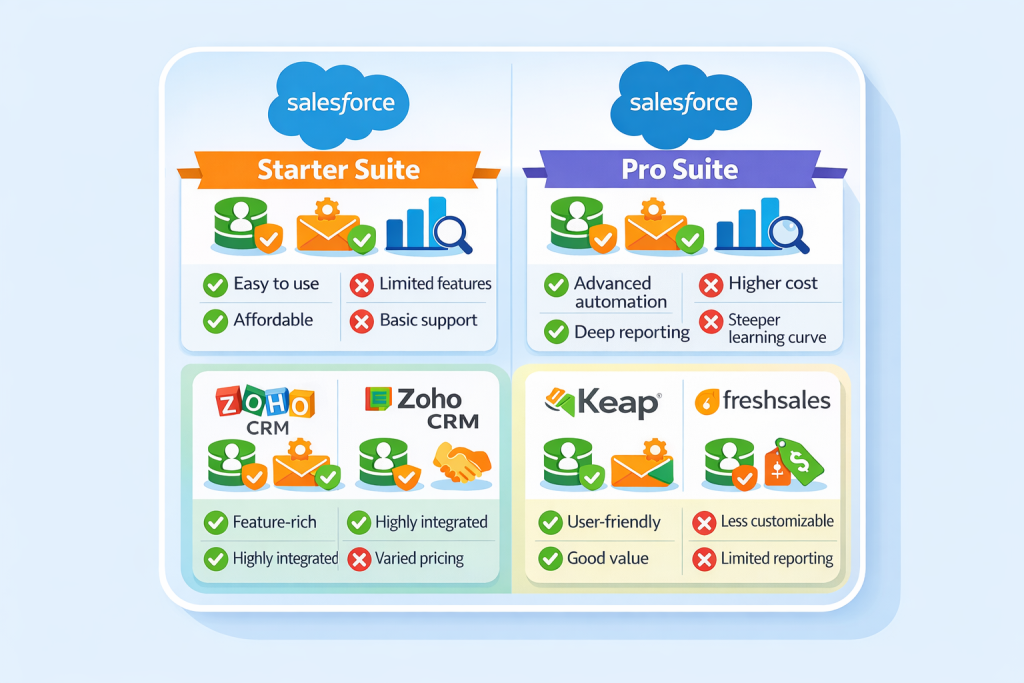
Salesforce Starter Suite
Overview: Why Salesforce for small businesses now
Salesforce Starter Suite is designed to bring enterprise-grade CRM capabilities within reach of smaller teams. For years Salesforce was considered too complex or expensive for most SMBs. That changed as Salesforce simplified entry packages for early growth companies looking to build repeatable sales and marketing processes without losing long-term scalability. Cloud-native performance, mature integrations, and an ecosystem of partner apps give Starter Suite a durability few alternatives match.
Best for: Early-stage SMBs wanting enterprise foundations
Starter Suite is ideal for teams that expect to grow into more advanced systems but need a reliable foundation today. If you plan to move beyond spreadsheets, fragmented tools, or basic CRMs within 12–24 months, Starter Suite lets you build consistent processes without switching platforms later.
Key features:
- CRM: Central contact and company records, pipeline management, custom fields, task tracking
- Email marketing: Built-in marketing tools for newsletters, segmentation lists, and campaign sends
- Reporting: Standard dashboards and performance reporting to measure sales trends and activity
Strengths vs HubSpot
Salesforce Starter Suite is stronger in long-term scalability and ecosystem integrations. It offers deeper CRM customization than comparable HubSpot entry tiers and doesn’t require expensive add-ons to unlock basic reporting and workflows. For teams that want stable foundations over flashy features, Salesforce Starter Suite wins consistency and extensibility.
Limitations
The user experience can feel less intuitive than HubSpot, especially for non technical users. Email marketing features are functional but not as polished as dedicated tools or HubSpot’s mid-tier capabilities. Setup often requires some expertise or support.
Pricing snapshot
Starting price for Salesforce Starter Suite is competitive with mid-tier SMB plans, typically billed per user per month with standard contract options. Pricing scales predictably with added users and optional features.
Salesforce Pro Suite
Who this is really for
Salesforce Pro Suite targets SMB teams that have outgrown basic CRM functionality and want a robust system without the premium packaging or complexity of enterprise editions. Teams focused on both sales and advanced automation benefit most.
Automation & analytics depth
Pro Suite offers powerful automation capabilities including advanced workflows, triggers, lead scoring, and multi-step sequences. Built-in analytics provide deep insights into pipeline health, sales performance, and campaign effectiveness. These features approach or exceed what mid-tier HubSpot workflows deliver, especially where custom logic and rule based actions are required.
Scalability advantage
Unlike many alternatives that force platform swaps at higher usage levels, Pro Suite scales seamlessly. Whether adding users, expanding automation complexity, or integrating external tools, the architecture supports growth without disruptive migrations.
Tradeoffs vs HubSpot
HubSpot’s interface is often easier for non technical marketing users. While Pro Suite has more power under the hood, it may require more setup time and administrative attention. Some marketing specific tools like landing page builders or attribution reporting are less intuitive compared to HubSpot’s native ecosystem.
Pricing tier context
Pro Suite sits in a mid-tier SMB price band. It costs more than entry level CRM tools, but includes automation and reporting that often require expensive add-ons in other platforms. For teams that need both sales and automation without modular pricing complexity, Pro Suite can be cost-efficient.
ActiveCampaign
Automation strength comparison
ActiveCampaign is widely recognized as one of the best marketing automation engines outside of HubSpot. Its visual automation builder allows complex sequences with conditional logic, multi-channel triggers, tagging, and dynamic content personalization. For email-centric workflows, it rivals or exceeds HubSpot’s automation depth at similar or lower price points.
CRM vs marketing-first positioning
ActiveCampaign’s core DNA is marketing first. While it includes a functional CRM, pipeline, and deal tracking features, these are not as fully developed as dedicated CRM platforms. The focus remains on nurturing contacts, scoring leads, and automating customer journeys rather than deep account management or sales forecasting.
Ideal use cases (content, email-heavy teams)
Teams that depend heavily on email marketing, automated lead nurturing, and long-term engagement campaigns find ActiveCampaign especially valuable. Content publishers, e-commerce sellers, consultants, and service businesses that run educational email sequences benefit from its automation flexibility.
Weaknesses vs HubSpot CMS & reporting
ActiveCampaign lacks a native content management system, landing page builder, and some of HubSpot’s intuitive analytics dashboards. While third-party integrations can fill these gaps, they add complexity and cost. Reporting is powerful for email performance and automation analytics but less comprehensive for full funnel visibility compared to HubSpot’s built-in dashboards.
Pricing clarity
ActiveCampaign’s pricing tiers are transparent and based primarily on contact volume. Automation features unlock predictably at defined tiers, and upgrades rarely come with hidden fees. For teams prioritizing automation over all-in-one packaging, this pricing model is easier to forecast than HubSpot’s usage-based costs.
Zoho CRM (Zoho One Option)
Zoho ecosystem overview
Zoho CRM is one of the cornerstones of the Zoho suite, a broad ecosystem encompassing CRM, marketing, finance, HR, collaboration, and operations tools. Whereas many platforms focus on a single domain, Zoho’s strategy is unified business software under one roof. Zoho One packages all applications in a single subscription, making it uniquely positioned for cost-conscious teams that want breadth without multiple vendors.
CRM + marketing + finance angle
Zoho CRM handles the core CRM functions—contacts, deals, pipelines, activities, and custom modules—effectively. It easily integrates with Zoho Marketing Automation for email campaigns, web forms, and lead nurturing. Finance components such as Zoho Books and Invoice link revenue data directly to customer records. This tight connection between CRM and financial tools is uncommon outside of enterprise stacks and enables revenue tracking across the entire customer lifecycle.
Customization power
Zoho offers extensive customization. Users can build custom modules, edit layouts, automate field logic with blueprints, and execute advanced workflows. Compared to most competitors at similar price levels, Zoho’s customization capabilities are among the most flexible. This flexibility empowers teams to tailor processes without external development support.
Learning curve considerations
The tradeoff for this configurability is complexity. Zoho’s interface can feel dense to new users, and initial setup often requires deliberate planning. Teams without dedicated administrators might find early navigation and configuration slower than simpler CRM alternatives.
Why SMBs switch from HubSpot to Zoho
Many SMBs transition from HubSpot to Zoho because of value. Zoho’s pricing and bundled offerings reduce the need for multiple subscriptions. Businesses that outgrow HubSpot’s contact limits or tiered feature gates appreciate Zoho’s straightforward access to automation, reporting, and integrations without escalating costs. Service businesses also benefit from Zoho’s integrated finance and support modules, replacing disjointed tool sets.
Pipedrive
Visual pipeline advantage
Pipedrive’s core differentiator is its visual sales pipeline. Users can drag and drop deals between stages, customize pipelines for distinct workflows, and visualize progress at a glance. This intuitive interface accelerates adoption and provides immediate clarity for sales teams, even without deep CRM experience.
Simplicity vs HubSpot
Pipedrive prioritizes simplicity. Unlike HubSpot’s broad feature set, Pipedrive keeps the focus on closing deals. Interface, navigation, and core functionality are designed to eliminate noise. For small sales teams that find HubSpot’s layers overwhelming, Pipedrive delivers a streamlined experience where key tasks are accessible within a few clicks.
Automation limits
Although Pipedrive offers automation capabilities like automated activity creation and triggers, its automation depth is generally lighter than HubSpot’s. Complex sequences, multi-step campaigns, or cross-channel automation require third-party integrations. This design aligns with Pipedrive’s philosophy—optimize pipeline flow first and foremost.
Best industries
Pipedrive works well for high-velocity sales environments such as B2B services, consulting firms, real estate teams, and technology sellers. These industries benefit from visual deal tracking and straightforward pipeline management without extensive marketing automation.
Pricing tiers
Pipedrive’s pricing is transparent and tiered based on features. Entry tiers include core CRM and pipeline views. Mid tiers add automation and forecasting tools. Higher tiers unlock team metrics and advanced reporting. Pricing remains competitive for sales-driven teams with predictable scalability.
Freshsales (Freshworks CRM)
Sales + support integration
Freshsales, part of the Freshworks family, combines CRM with customer support alignment. It tracks contacts, deals, and communications like traditional CRM tools, while seamlessly linking to support tickets, chat, and customer history. This connection eliminates silos between sales and support teams, helping ensure continuity in customer interactions.
AI lead scoring
Freshsales includes AI-driven lead scoring that surfaces high-value prospects based on behavior, engagement, and historical patterns. This reduces manual qualification work and focuses reps on leads with the best conversion potential. For SMBs with limited sales operations resources, this intelligent scoring adds disproportionate value.
SMB onboarding experience
Freshsales is built with SMB onboarding in mind. Setup is generally straightforward, with guided tutorials and in-product help that walk users through core configuration. Many teams are able to import data, define pipelines, and begin using key features within a short timeframe.
Downsides vs HubSpot marketing tools
While Freshsales excels at sales and support consolidation, its marketing automation tools are not as robust as HubSpot’s native suite. Email campaign builders, landing pages, and attribution reporting are functional but lighter in capability. Organizations dependent on complex lead nurturing or deep analytics may supplement Freshsales with other marketing platforms.
Pricing snapshot
Freshsales pricing is modular and competitive. Entry tiers include basic CRM and contact management. Higher tiers add automation, AI, and support features. Pricing scales with feature depth rather than raw contact volume, keeping cost predictable for small to mid-sized teams.
EngageBay
All-in-one promise
EngageBay positions itself as a budget-friendly all-in-one platform combining CRM, marketing automation, email sequences, and customer support tools. The core idea is simple: give small teams broad functionality without the fragmented tool stacks or tiered pricing that inflate costs in other platforms. For businesses sensitive to budget yet needing multiple capabilities, EngageBay’s integrated model resonates.
CRM + automation capabilities
At its core, EngageBay includes contact management, deal pipelines, task tracking, and basic segmentation. The automation builder supports multi-step workflows with conditions and triggers, enabling teams to automate email sequences, lead scoring, and follow-ups without external tools. While not as advanced as high-end automation engines, this level of automation is sufficient for early stage SMBs building repeatable processes.
Who it’s ideal for
EngageBay is ideal for solopreneurs, small marketing teams, and early growth businesses that want “one platform for everything” without scaling costs. Companies that need basic CRM, email campaigns, and integrated support tickets enjoy the simplicity and low entry price. It is particularly attractive for companies launching inbound campaigns, basic nurture sequences, or service follow-ups on a lean budget.
Feature gaps vs HubSpot
Compared to HubSpot, EngageBay’s limitations are clear in depth and polish. Advanced reporting, deep multi-channel automation, and built-in CMS or landing page builders are either limited or require third-party tools. HubSpot’s interface and maturity in marketing analytics also remain ahead. For teams with significant marketing complexity, EngageBay may feel functionally constrained.
Price-to-value breakdown
EngageBay’s pricing is significantly lower than many alternatives, with generous feature access even at entry tiers. Unlimited users in some plans and flat pricing on automation can make it extremely cost effective for small teams. For businesses where ROI is sensitive to software spending, the value equation often tilts in EngageBay’s favor despite some feature tradeoffs.
Keap
Client lifecycle automation
Keap (formerly Infusionsoft) focuses on automating the client lifecycle from lead capture through follow-up and retention. It provides robust automation tools that streamline repetitive tasks such as scheduling follow-ups, sending conditional emails, and tracking engagement. Workflows are visual and customizable, allowing solopreneurs and small teams to build nurture sequences tailored to their audiences.
Invoicing + CRM combo
One of Keap’s distinctive strengths is the integration of CRM with invoicing and payments. Users can create estimates, send invoices, accept payments, and track revenue without tying together separate platforms. This unified experience reduces administrative friction, especially for service providers who depend on continuous cash flow visibility and client communication.
Strength in small service workflows
Service-oriented businesses—including consultants, coaches, and freelancers—benefit from Keap’s workflow templates, appointment reminders, and automated client onboarding. These capabilities support repeatable client processes without extensive manual effort, freeing time for billable work rather than administrative coordination.
Why it’s not for everyone
Keap’s specialized focus means it is not the best fit for every business. Product-centric e-commerce teams or marketing teams with complex multi-channel campaigns may find Keap’s automation limiting compared to broader platforms. Also, teams without well-defined service workflows might underutilize its core strengths. The interface can require an initial learning period to align workflows with business logic.
Pricing clarity
Keap’s pricing is tiered based on feature access and contact volume. Entry tiers include essential automation and invoicing capabilities. Higher tiers unlock advanced automation, analytics, and coaching support. Overall, pricing remains predictable relative to contacts managed, but businesses should plan based on user count and inbox activity rather than feature fences alone.
GoHighLevel
Agency-first positioning
GoHighLevel differentiates itself by targeting agencies, consultants, and white-label resellers. Its feature set emphasizes client management and service delivery in addition to CRM and automation. Agencies use GoHighLevel to build branded stacks for multiple clients within a single platform, reducing the need for separate tool subscriptions for each client.
White-label CRM + automation
The white-label capability is a standout advantage. Agencies can brand the interface, emails, and portals as their own, making GoHighLevel a revenue-generating asset rather than just an internal tool. The CRM includes pipelines, automated triggers, contact scoring, and appointment scheduling. This integrated stack simplifies onboarding clients and managing campaigns at scale.
Funnels, SMS, pipelines
GoHighLevel’s automation extends beyond email to include SMS sequences, appointment reminders, two-way texting, and sales funnels. The funnel builder supports landing pages, forms, and conversion paths optimized for lead capture and nurturing. These multi-channel capabilities allow agencies to execute integrated campaigns without separate vendors.
Complexity warning
The breadth of features comes with a complexity tradeoff. GoHighLevel can feel overwhelming to users without prior CRM or multi-channel automation experience. Customization options are deep, but that depth requires intentional setup and a learning curve that may slow early adoption. Teams without technical resource support might struggle initially.
Cost comparison vs HubSpot
GoHighLevel’s pricing is competitive with HubSpot’s entry and mid tiers—especially when managing multiple client accounts. Where HubSpot charges per contact and add-on features, GoHighLevel’s white-label model consolidates costs and creates revenue opportunities for agencies. For single business users, the price benefit is less pronounced, but for agencies serving multiple clients, the value proposition often outweighs HubSpot’s per-seat pricing.
Systeme.io
Funnels + email + courses
Systeme.io is built as a unified platform for creators, course sellers, and digital entrepreneurs who need simple but effective marketing tools. Its core suite includes funnel builders, email automation, webinar hosting, and online course delivery — all designed to work together without stitching multiple tools.
Simplicity vs HubSpot sprawl
Systeme.io’s biggest advantage is ease of use. Unlike HubSpot’s broad ecosystem with modules for CRM, marketing, sales, and service, Systeme.io keeps feature scope tight and focused on directly monetizable activities. For creators, this means launching funnels, automations, and products without navigating complex settings or enterprise menus.
Limitations in CRM depth
Where Systeme.io shines in simplicity, it lags in traditional CRM functionality. Contact records are basic, deal pipelines are limited, and sales forecasting or deep account management features are absent. For teams that require robust CRM workflows, this is a clear trade-off.
Pricing advantage
One of Systeme.io’s strongest selling points is its pricing. With plans that include funnels, automation, hosting, and course delivery at competitive flat rates, creators often spend a fraction of what they would with HubSpot’s contact-based pricing. This predictability makes budgeting easier for small businesses and solo founders.
Ideal use cases
Systeme.io works best for digital creators, coaches, course businesses, and solopreneurs who want a simple system to launch products and automate basic funnels. It is especially valuable for those who prioritize conversion tools and course delivery over deep CRM or enterprise marketing analytics.
Monday CRM
Project + CRM hybrid
Monday CRM extends the visual and collaborative strengths of monday.com into customer relationship management. Instead of treating CRM as a siloed system, Monday CRM blends pipeline tracking with project plans, task assignments, and team workflows. This hybrid approach gives teams a holistic view of work in progress and customer engagement.
Custom workflows
A major strength of Monday CRM is its configurability. Users can build custom workflows using drag-and-drop boards, automations, and conditional logic. Whether teams need approval processes, cross-department tasks, or complex project dependencies, Monday’s visual builder supports non-technical customization.
Visual clarity
Where many CRM platforms present rigid lists and dashboards, Monday CRM excels in visual clarity. Color-coded boards, customizable views, and timeline or calendar layouts make it easier for teams to see what’s happening at a glance. For workflow-driven teams, this visual context reduces coordination overhead.
Where it falls short vs HubSpot
Monday CRM is strong on workflows and collaboration, but it lacks some core marketing features that HubSpot includes natively — such as advanced marketing automation, built-in CMS, and deep attribution reporting. Teams that require extensive campaign analytics or inbound marketing tools may find Monday CRM better suited as part of a stack rather than as a standalone replacement.
Pricing tiers
Monday CRM pricing is tiered based on users and feature access. Entry plans include basic CRM boards and views. Mid tiers unlock automation, custom dashboards, and integrations. Higher plans add advanced workflow widgets and enterprise-grade controls. Pricing is generally predictable but scales with user seats.
Close CRM
Calling & email power
Close CRM is built with inside sales and outbound teams in mind. Its platform emphasizes multi-channel communication, including integrated calling, SMS, and email sequences from within the CRM. Reps can dial prospects directly, log communications automatically, and keep all interactions tied to contact records.
Speed vs automation depth
Close is designed for speed and activity volume. Unlike automation platforms that emphasize multi-step nurture campaigns, Close prioritizes rapid outreach and rep efficiency. Sequences are straightforward and effective for short to mid-cycle sales engagements, but they do not match the depth of conditional automation found in platforms like HubSpot or ActiveCampaign.
Ideal team size
Close is best for small to mid-sized inside sales teams that move quickly and rely on personal outreach. Teams with a heavy emphasis on calling and direct engagement — such as tech SDR groups, B2B consultative sales teams, and subscription services — benefit most from Close’s design.
Missing marketing features
Close does not include advanced marketing automation, landing page builders, or content marketing tools. Teams that expect to run inbound campaigns, nurture large contact lists, or analyze marketing attribution will likely need additional tools to fill those gaps.
Pricing overview
Close’s pricing is centered on user seats and outreach volume. Entry tiers provide core CRM and communication tools. Higher tiers expand reporting, workflow automation, and funnel insights. Pricing remains competitive for sales-intensive organizations, though total cost scales with the number of users and communication volume.

How to Choose the Right HubSpot Alternative
Choosing the right HubSpot alternative is less about feature comparisons and more about alignment. The best platform is the one that fits how your business operates today while supporting the next stage of growth. Breaking the decision down by business persona helps remove noise and accelerates clarity.
Solopreneurs
Solopreneurs benefit most from simplicity, speed, and predictable pricing. Deep customization and enterprise reporting rarely justify the added complexity. Tools like Systeme.io, EngageBay, or Keap work well because they combine core CRM, email automation, and monetization features in a single environment. The priority here is reducing tool sprawl and manual work rather than building a future proof enterprise stack.
SMB teams
Small to mid sized teams need balance. CRM reliability, automation depth, and collaboration matter, but usability is still critical. Platforms such as Zoho CRM, Freshsales, and Salesforce Starter Suite offer strong foundations without forcing immediate enterprise level commitment. SMBs should favor tools with clear upgrade paths and transparent pricing rather than entry plans that quickly become restrictive.
Agencies
Agencies operate differently from internal teams. Client management, repeatable delivery, and branding control are core requirements. GoHighLevel stands out for agencies due to its white label capabilities and multi account structure. Monday CRM can also work for agencies that prioritize workflow visibility and collaboration over marketing automation. For agencies, the platform should be a profit center, not just a cost.
SaaS startups
SaaS teams often need advanced automation, reporting, and integration flexibility. ActiveCampaign and Salesforce Pro Suite align well with data driven growth and multi touch journeys. Startups should prioritize tools that support experimentation, analytics, and scalable automation without locking them into rigid workflows too early.
Sales led organizations
Sales driven companies care most about speed, visibility, and rep productivity. Pipedrive and Close CRM excel here by keeping focus on pipelines, outreach, and closing efficiency. Marketing heavy platforms may feel bloated in sales led environments where direct engagement drives revenue.
When viewed through this lens, the right choice becomes far clearer and far more defensible.
Final Verdict: Is HubSpot Still Worth It?
HubSpot remains a strong platform. It is well built, widely adopted, and effective for many organizations. However, it is not a universal solution, and it should not be treated as the default choice simply because of brand recognition.
For some businesses, HubSpot delivers exactly what they need. For others, it introduces unnecessary cost, complexity, or rigidity. Over the past few years, the ecosystem of alternatives has matured significantly. Many platforms now outperform HubSpot in specific areas, particularly price efficiency, focus, and ease of use.
Budget conscious teams often find better value elsewhere. Sales first organizations prefer tools that remove distractions rather than add layers. Creators and service businesses benefit from platforms designed around monetization and delivery instead of enterprise scale marketing. Agencies increasingly choose systems that let them own the client experience rather than rent it.
The most important takeaway is this: match the tool to the stage of the business. A platform that is perfect at one stage can be excessive or limiting at another. Choosing software based on fit, not hype, leads to better adoption, lower churn, and stronger returns.
HubSpot is worth it when it fits. It is not worth forcing when it does not.
FAQs
What is the closest competitor to HubSpot?
The closest competitors to HubSpot are Salesforce Pro Suite and Zoho CRM. Both offer robust CRM functionality combined with automation and reporting, though each approaches usability and pricing differently.
Are there cheaper HubSpot alternatives?
Yes. Platforms such as EngageBay, Systeme.io, Zoho CRM, and Pipedrive are significantly more affordable, especially for small teams. Many provide essential features without usage based pricing that scales aggressively.
Which HubSpot alternative is best for small businesses?
There is no single best option for all small businesses. Zoho CRM and Freshsales work well for growing teams. EngageBay suits budget focused businesses. Pipedrive is ideal for sales driven SMBs. The best choice depends on workflow and growth plans.
Is HubSpot overkill for SMBs?
For many SMBs, yes. HubSpot is designed to scale across large teams and departments. Smaller teams often pay for features they do not fully use, while still lacking flexibility in pricing or configuration.
Can I replace HubSpot with multiple tools?
Absolutely. Many businesses replace HubSpot with a modular stack combining a CRM, email marketing platform, and automation tool. This approach can reduce cost and increase flexibility, though it requires careful integration planning.
If you want, the next step can be turning this entire article into a ready to publish SEO piece or adapting it for a specific audience or region.


